Export your logbook from Below
Below exports your whole logbook free as CSV, PDF, UDDF or Subsurface XML, and as a .below archive.


- In Below, open Settings → Data & Sync. The export rows are CSV, PDF, UDDF and Subsurface XML.
- Tap a format. Below writes the file for every dive and opens the share sheet, where you can AirDrop it, save it to Files or send it.
- For a complete copy, choose Export Backup. It writes a .below archive of every dive, site and photo, and Below can import it again.
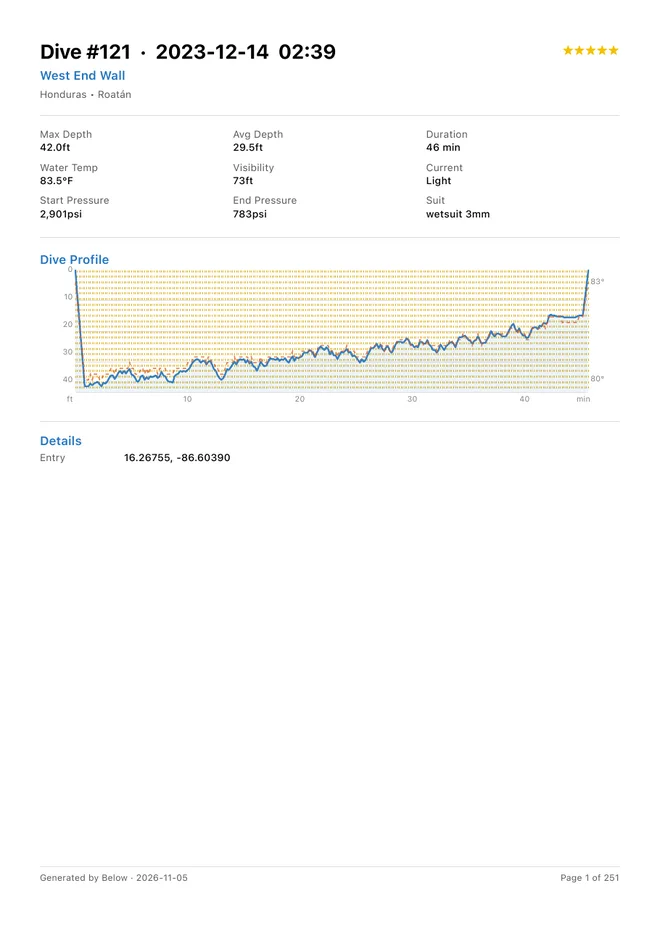
- The PDF is for reading and printing. It has one A4 page per dive, with its profile when the dive has samples.
What each file keeps is the table below; each cell comes from writing the file and opening it again.
| Field | UDDF | Subsurface XML | CSV | .below archive | |
|---|---|---|---|---|---|
| Date and start time | Kept | Kept | Kept | Kept | Kept |
| Time zone offset | Kept | Kept | Lost | Kept | Not checked |
| Dive time | Kept | Kept | Kept | Kept | Kept |
| Surface interval | Kept | Lost | Lost | Kept | Not checked |
| Dive number | Kept | Kept | Kept | Kept | Kept |
| Dive mode | Kept | Kept | Lost | Kept | Not checked |
| Max depth | Kept | Kept | Kept | Kept | Kept |
| Average depth | Kept | Kept | Kept | Kept | Kept |
| Lowest water temperature | Kept | Kept | Kept | Kept | Kept |
| Air temperature | Kept | Kept | Kept | Kept | Kept |
| Visibility | Kept | Lost | Kept | Kept | Kept |
| Site name | Kept | Kept | Kept | Kept | Kept |
| Site latitude | Kept | Kept | Kept | Kept | Kept |
| Site longitude | Kept | Kept | Kept | Kept | Kept |
| Site country | Kept | Kept | Kept | Kept | Kept |
| Site region | Kept | Kept | Kept | Kept | Kept |
| Gas mixes | Kept | Kept | Lost | Kept | Not checked |
| A gas mix with no cylinder | Kept | Lost | Lost | Kept | Not checked |
| Cylinders | Kept | Kept | Lost | Kept | Not checked |
| Cylinder working pressure | Lost | Kept | Lost | Kept | Not checked |
| Start pressure | Kept | Kept | Kept | Kept | Kept |
| End pressure | Kept | Kept | Kept | Kept | Kept |
| CNS at the end of the dive | Lost | Kept | Lost | Kept | Not checked |
| Rating | Kept | Kept | Kept | Kept | Kept |
| Buddy | Kept | Kept | Kept | Kept | Kept |
| Dive guide | Not checked | Not checked | Kept | Kept | Kept |
| Notes | Kept | Kept | Kept | Kept | Kept |
| Tags | Kept | Kept | Kept | Kept | Kept |
| Species sightings | Kept | Kept | Lost | Kept | Kept |
| Depth profile | Kept | Kept | Lost | Kept | Not checked |
| Temperature per sample | Kept | Kept | Lost | Kept | Not checked |
| Cylinder pressure per sample | Kept | Kept | Lost | Kept | Not checked |
| NDL per sample | Kept | Kept | Lost | Kept | Not checked |
| Ceiling per sample | Kept | Kept | Lost | Kept | Not checked |
| CNS per sample | Kept | Kept | Lost | Kept | Not checked |
| ppO2 per sample | Kept | Lost | Lost | Kept | Not checked |
| Heart rate per sample | Kept | Kept | Lost | Kept | Not checked |
Not checked means Below has not confirmed the field comes across, so this table makes no claim about it.
One cell needs a word: a Subsurface XML file does carry each sample's ppO2, in Subsurface's own po2 field. The table marks it Lost because when Below opens its own file again, that value lands in a different field, and the chart's ppO2 lane stays empty.
The table makes no claim about a PDF's fields. A PDF is one A4 page per dive, with its profile when the dive has samples, and it cannot be imported into Below.
Exports are free. UDDF and Subsurface XML carry the profile samples, CSV has one row per dive, and the PDF draws the profile. The full profile chart in the app is Below Unlimited; no export needs it.